
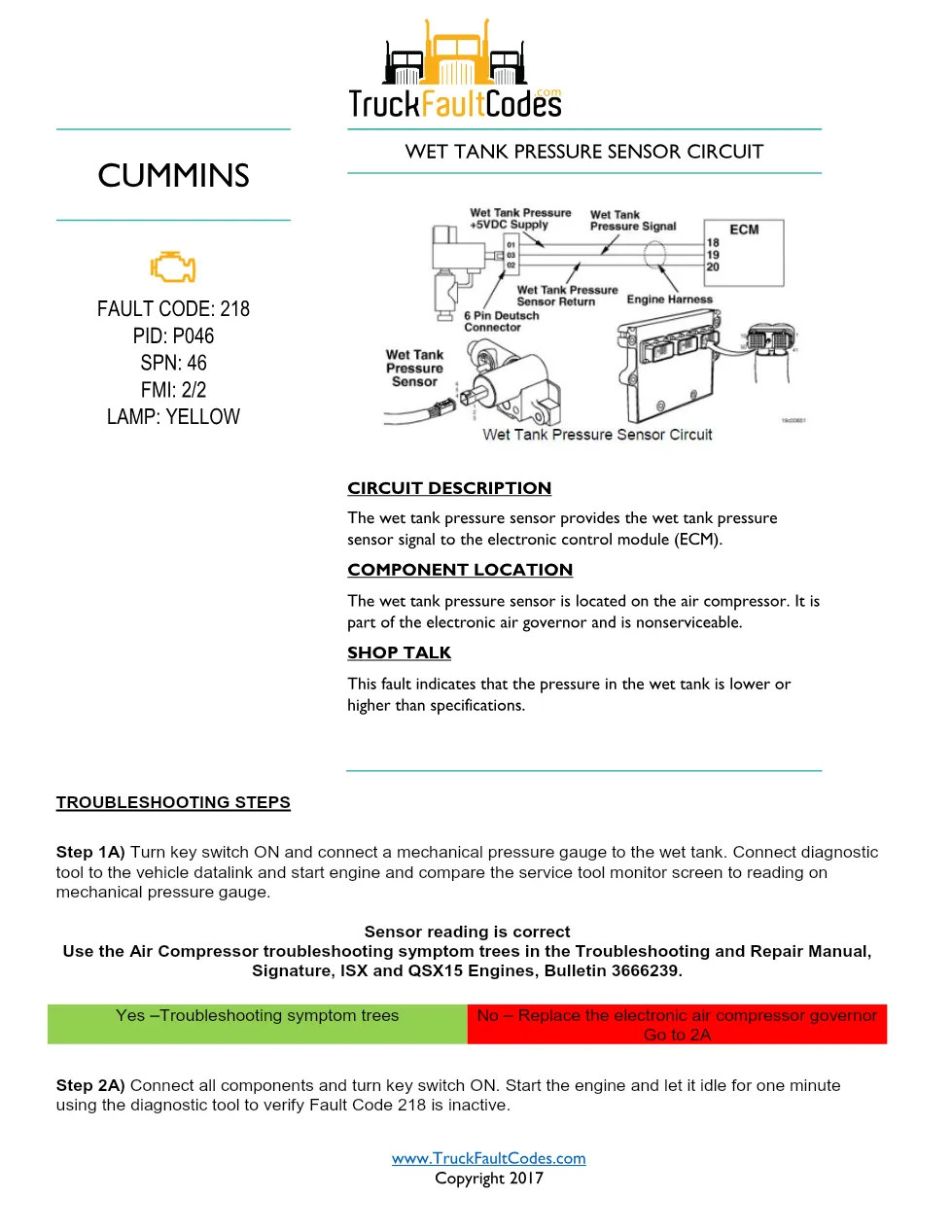
Cummins ISM Code 218 documents the Wet Tank Pressure Out of Range diagnostic and troubleshooting procedure for the Cummins ISM CM570 (1999-02) engine platform. This 2-page fault code sheet from TruckFaultCodes.com (Copyright 2017) covers fault code 218 (PID P046, SPN 46, FMI 2/2, YELLOW lamp) and the checks used to confirm and clear it.
Official document details
| Brand | Cummins |
|---|---|
| Model coverage | ISM CM570, ISX CM570, Signature CM570 (1999-02) |
| System / Group | Diagnostic Trouble Codes (DTCs) |
| Fault code | 218 — PID P046, SPN 46, FMI 2/2 |
| Warning lamp | YELLOW |
| Pages | 2 |
| File size | 0.2 MB |
| Format | |
| Language | English |
Document table of contents
- Circuit description
- Component location
- Shop talk
- Troubleshooting steps
- Fault code verification and clearing
Cummins ISM Code 218 diagnostic steps
This fault indicates the wet tank pressure is lower or higher than specifications. The sensor is part of the electronic air governor on the air compressor and is nonserviceable. The short two-page procedure has technicians confirm the reading with a service tool, inspect the sensor and connector, and verify actual system air pressure against specification before deciding whether the sensor or the air system needs attention, then clear the code.
Applicable truck models
This sheet applies to Cummins ISM CM570, ISX CM570, and Signature CM570 (1999-02) engines built around the CM570 ECM and the wet tank pressure. The wet tank pressure sensor sits on the air compressor as part of the electronic air governor and is nonserviceable. The document is laid out with a circuit description, a component location note, shop-talk tips, and a step-by-step troubleshooting chart whose go-to branches route the technician through each measurement. Refer to the official Cummins engine support site for wiring diagrams and component part numbers.
Who needs this Cummins ISM Code 218 manual
Heavy-duty diesel technicians, fleet service teams, and owner-operators diagnosing a yellow-lamp wet tank pressure fault will use this sheet to follow the factory decision tree, confirm the reading, and repair the harness, connector, or component instead of replacing parts on guesswork. It spells out each measurement threshold and its pass or fail branch, so the fault can be verified active, the repair validated, and the inactive code cleared with the diagnostic tool.
The full PDF is available in the DiagTechPro manuals library; a free account is required to download.
Related manuals library
Sản phẩm liên quan cho hãng này
Cùng brand theo taxonomy hiện có trong catalog WooCommerce.

Cummins INSITE 9.3 – The Essential Diagnostic Tool for Cummins Engines

Cummins Calterm Version 5.16 – Advanced ECM Control and Precision Tuning for Cummins Engines

Cummins InCal CE – The Calibration and Configuration Tool for Cummins Engines


