
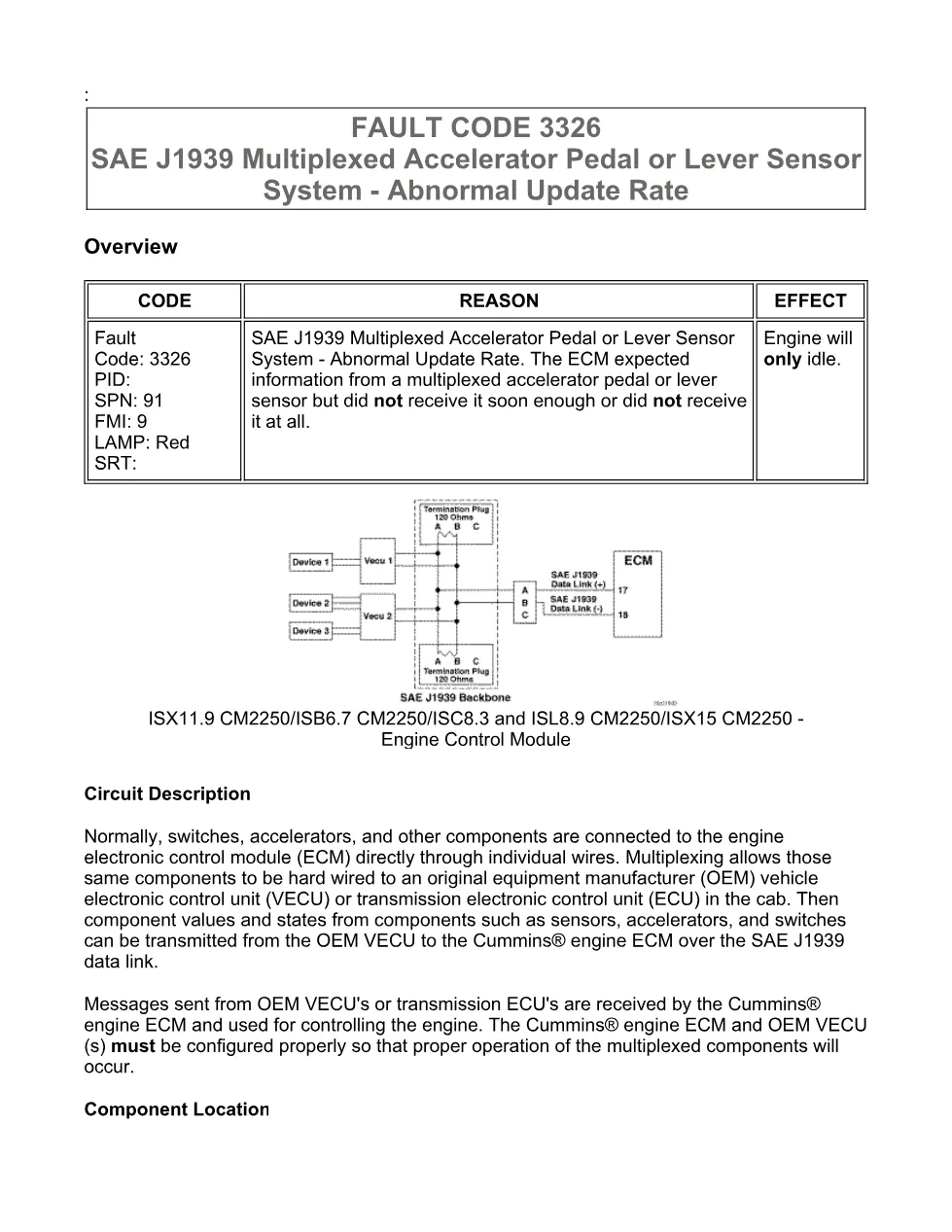
The Cummins fault code 3326 troubleshooting manual is the official Cummins procedure for diagnosing SAE J1939 Multiplexed Accelerator Pedal or Lever Sensor System – Abnormal Update Rate (SPN 91, FMI 9). The ECM receives accelerator pedal or lever position over the multiplexed SAE J1939 data link. This code sets when the ECM expected information from a multiplexed accelerator pedal or lever sensor but did not receive it soon enough or did not receive it at all. The red warning lamp behaviour and the exact conditions that set and clear the code are documented step by step.
Cummins fault code 3326 document details
| Brand | Cummins |
|---|---|
| Model coverage | Cummins ISX11.9, ISB6.7, ISC8.3 and ISL8.9, and ISX15 CM2250 (2010-12) engines |
| System / Group | ISX11.9 CM2250 (2010-12) / DTCs |
| Fault code | 3326 — SPN 91, FMI 9 |
| Warning lamp | Red |
| Year / Revision | 2010-12 (CM2250) |
| Pages | 15 |
| File size | 0.2 MB |
| Format | |
| Language | English |
Document table of contents
- Overview and Circuit Description
- Component Location
- Conditions for Running the Diagnostics
- Conditions for Setting the Fault Codes
- Action Taken When the Fault Code is Active
- Associated Procedures and Troubleshooting Steps
- Guided circuit-response and connector checks
- Conditions for Clearing the Fault Codes
Applicable truck models covered
This document applies to Cummins ISX11.9, ISB6.7, ISC8.3 and ISL8.9, and ISX15 CM2250 (2010-12) engines. The engine will only idle while the fault is active. The guided steps rely on the Cummins INSITE electronic service tool to read active codes, monitor sensor data and confirm the repair. Always confirm engine and calibration coverage against the official Cummins engine support site before ordering parts.
Who needs this Cummins fault code 3326 manual
Diesel technicians and workshop owners servicing CM2250 platform engines use this file to work SPN 91 / FMI 9 in the correct order instead of guessing at parts. It lists every conditions block, associated procedure and guided circuit-response check, with the connector and harness inspection points and the specifications each step expects. Following the tree in sequence keeps the repair accountable and lets the technician confirm the fault is cleared once and verified with the Cummins INSITE electronic service tool.
The full PDF, including the complete guided troubleshooting tree and specifications, is available in the DiagTechPro manuals library; a free account is required to download it.
Related manuals library

Sản phẩm liên quan cho hãng này
Cùng brand theo taxonomy hiện có trong catalog WooCommerce.

Cummins INSITE 9.3 – The Essential Diagnostic Tool for Cummins Engines

Cummins Calterm Version 5.16 – Advanced ECM Control and Precision Tuning for Cummins Engines

Cummins InCal CE – The Calibration and Configuration Tool for Cummins Engines


