
This Cummins 1681 DEF diagnostic document is a 6-page troubleshooting manual for Fault Code 1681 on CM2250 engines. It explains the aftertreatment diesel exhaust fluid dosing unit circuit, the fault reason, the engine effect, and the guided checks used with INSITE™.
Official Cummins 1681 DEF diagnostic document details
| Brand | Cummins |
|---|---|
| Model coverage | ISB6.7 CM2250, ISC8.3 and ISL9 CM2250, ISX15 CM2250, ISX11.9 CM2250 |
| System/Group | ISB6.7 CM2250 (2010-12) / DTCs; aftertreatment diesel exhaust fluid dosing unit circuit |
| Year/Revision | Last Modified: 11-Jun-2010 |
| Pages | 6 |
| File size | 0.2 MB |
| Format | |
| Language | English |
Document table of contents
- Overview
- Circuit Description
- Component Location
- Conditions for Running the Diagnostics
- Conditions for Setting the Fault Codes
- Action Taken When the Fault Code is Active
- Conditions for Clearing the Fault Code
- Shop Talk
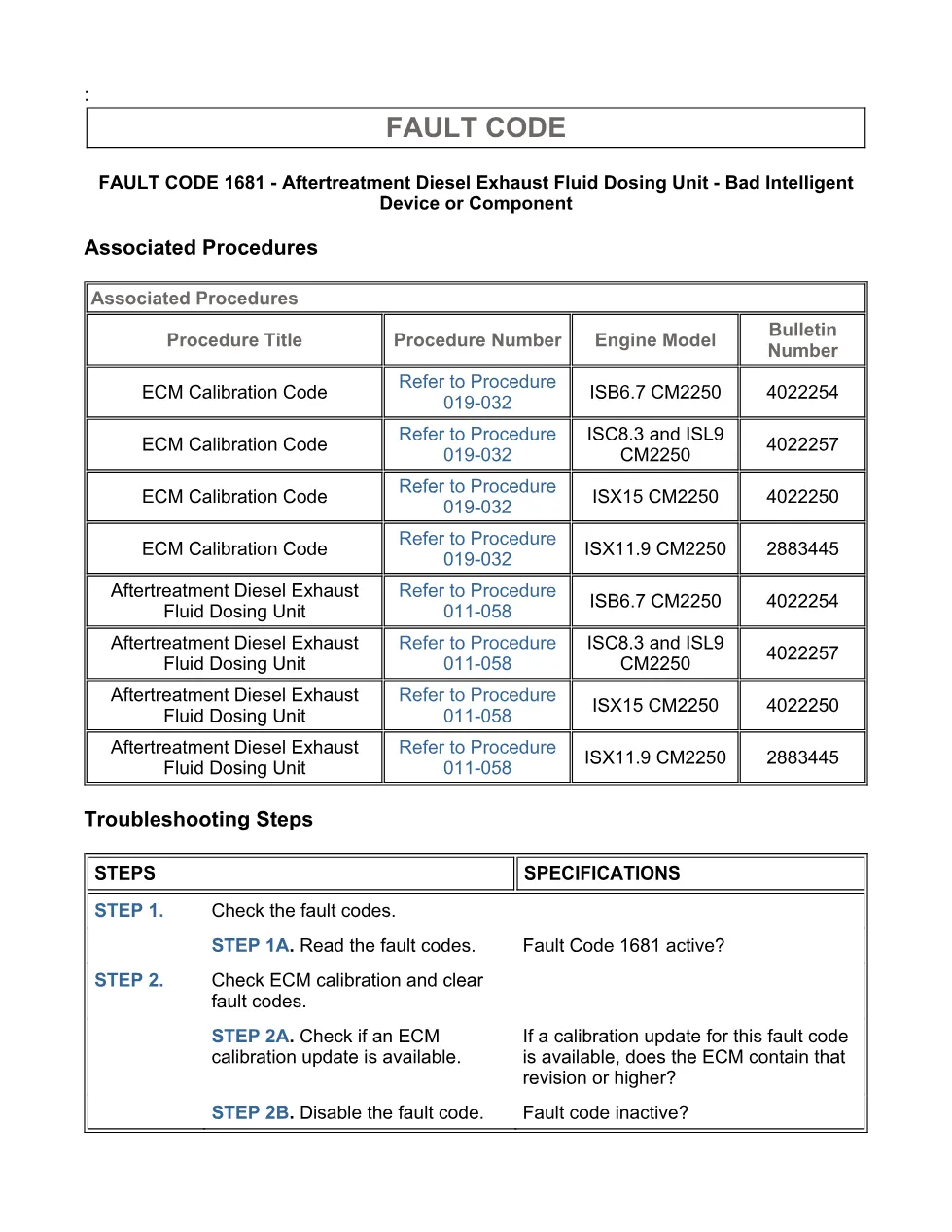
- Associated Procedures
- Troubleshooting Steps
- Guided Step 1 – Check the fault codes.
- Guided Step 1A – Read the fault codes.
- Guided Step 2 – Check ECM calibration and clear fault codes.
- Guided Step 2A – Check if an ECM calibration update is available.
- Guided Step 2B – Disable the fault code.
Applicable truck models
This file applies to Cummins CM2250 engine coverage shown in the procedure: ISB6.7 CM2250, ISC8.3 and ISL9 CM2250, ISX15 CM2250, and ISX11.9 CM2250. The component location is OEM dependent, so the document directs the technician to the OEM service manual for vehicle-specific mounting information. For manufacturer information, visit the Cummins official website.
Who needs this Cummins 1681 DEF diagnostic manual
This manual is useful for diesel technicians, fleet shops, and workshop owners diagnosing an active SPN 3361 FMI 12 complaint where the aftertreatment diesel exhaust fluid dosing unit reports an internal error. It supports checks with the INSITE™ electronic service tool, ECM calibration review, fault clearing, and replacement direction when Fault Code 1681 remains active.
The procedure states that the diagnostic runs continuously with the keyswitch in the ON position. When active, the ECM illuminates the amber CHECK ENGINE light and/or Malfunction Indicator Lamp immediately, disables diesel exhaust fluid injection into the SCR aftertreatment system, and may reduce engine torque if operation continues for an extended period. The repair validation step is to start the engine and let it idle for 1 minute; INSITE™ should then show the fault as INACTIVE after the diagnostic runs and passes.
The Cummins 1681 DEF diagnostic workflow centers on reading fault codes, comparing the ECM code and revision number against ECM Calibration Revision History, applying calibration procedure 019-032 if required, and using procedure 011-058 for the aftertreatment diesel exhaust fluid dosing unit. If all steps have been completed and checked again and the fault does not become inactive, the document directs contact with a Cummins® Authorized Repair Location.
Full PDF available in the DiagTechPro manuals library, free account required to download.
Related manuals library
Sản phẩm liên quan cho hãng này
Cùng brand theo taxonomy hiện có trong catalog WooCommerce.
Cummins INSITE 10.2 – Latest Diagnostic Software for Cummins Engines
Cummins Calterm Version 5.16 – Advanced ECM Control and Precision Tuning for Cummins Engines
Cummins InCal CE – The Calibration and Configuration Tool for Cummins Engines