
Brakes, stability control and air suspension are not systems you guess at. When a trailer ABS lamp stays on, or an ECAS-equipped tractor settles at the wrong ride height, you need the software the system was engineered around. WABCO TOOLBOX PLUS is that software — and it covers considerably more of the vehicle than ABS alone.
What TOOLBOX PLUS is — and what it is called now
TOOLBOX PLUS is a Windows PC application for diagnosing WABCO electronic control units on commercial trucks, tractors and trailers. It is a chassis-side tool: braking, stability, air suspension and driver-assistance electronics. It is not an engine or aftertreatment package, and it is not a handheld scan tool — it runs on a laptop connected through a diagnostic adapter.
Branding is worth clearing up, because it affects what you search for. ZF acquired WABCO in 2020, so the software is now a ZF product carrying the ZF/WABCO name. In North America the same application was previously sold as Meritor WABCO TOOLBOX. WABCO TOOLBOX PLUS, ZF TOOLBOX PLUS and Meritor WABCO TOOLBOX all point at the same family of software.
Which systems it actually covers
The common description — “ABS software” — sells it short. TOOLBOX PLUS addresses several distinct control systems, and knowing which ones matters when you’re deciding whether it fits the vehicles rolling into your bay.
Pneumatic ABS and EBS
Truck, tractor and trailer ABS, plus pneumatic EBS (electronic braking systems). You get fault code retrieval and clearing, live component data and the component-level detail needed to isolate a wheel speed sensor, modulator or wiring fault rather than guessing at it.
Hydraulic ABS and Hydraulic Power Brake (HPB)
Not every commercial vehicle runs air brakes. Medium-duty trucks, buses and motorhomes frequently use hydraulic ABS or Hydraulic Power Brake systems, and TOOLBOX PLUS covers those as well. This is the coverage area most often missed by shops that assume the tool is trailer-only.
Stability control
WABCO stability systems — SmartTrac and RSS (Roll Stability Support) — are supported alongside the base ABS function. Because stability control shares sensors and modulators with ABS, being able to see both in one application saves a great deal of back-and-forth during diagnosis.
ECAS air suspension
Electronically Controlled Air Suspension, including CAN-based ECAS, can be diagnosed and calibrated so ride height and levelling behave correctly after a repair or a component swap. Ride height calibration is one of the routine jobs a generic code reader simply cannot complete.
ADAS: OnGuard, OnLane, OnSide and TailGUARD
Driver assistance is where a lot of shops get stuck. TOOLBOX PLUS supports WABCO ADAS components including OnGuard collision mitigation, OnLane lane departure warning, OnSide side object detection and TailGUARD rear object detection. As these systems become more common on fleet equipment, being able to read and service them in the same application is increasingly the reason technicians choose this software.
Aftermarket ABS ECU programming
This is the capability most write-ups leave out, and it is arguably the strongest reason to have TOOLBOX PLUS on the bench. The software can program and configure replacement WABCO truck ABS ECUs, as well as the OnLaneALERT camera. ZF states that it is the only supplier offering aftermarket ABS ECU programming — meaning a replacement ECU can be configured in your own shop rather than sending the vehicle to a dealer. For a fleet workshop, that is the difference between a same-day repair and a truck sitting idle.
You will need an RP1210 adapter
TOOLBOX PLUS is software only. To talk to a vehicle you also need an RP1210-compliant diagnostic adapter — a vehicle datalink adapter (VDA) with a USB connection, such as a Nexiq USB-Link 2 or USB-Link 3. If you already run other heavy-duty OEM applications, the RP1210 adapter you own will very likely serve here too.
Pick the right protocol, or you get nothing
TOOLBOX PLUS communicates over SAE J1939 and J1708/J1587 for trucks and tractors, and over PLC (Power Line Carrier) for trailer ABS. That distinction trips people up constantly: a trailer ABS ECU reached over the power line will not answer a J1939 request. If the software reports no communication, protocol selection is the first thing to check — before you start chasing wiring.
PC requirements
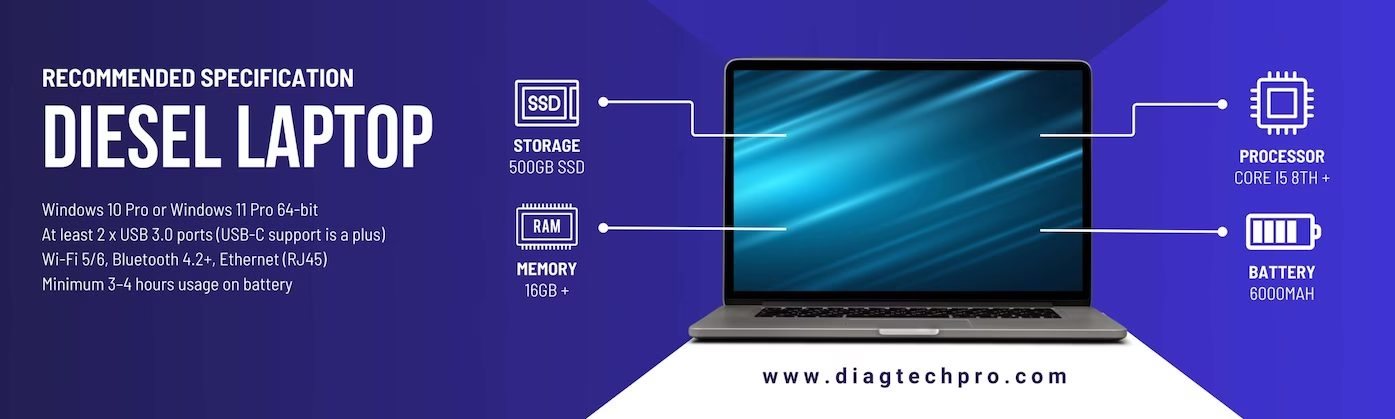
TOOLBOX PLUS is Windows-only, supported on Windows 7, 8, 10 and 11. It requires .NET Framework 4.8 or later, roughly a 1 GHz processor, 1–2 GB of RAM and about 300 MB of disk space. There is no macOS build and no handheld version. Any modern shop laptop will run it comfortably — the constraint is Windows, not horsepower.
Features that save real time
Several smaller functions do a lot of work day to day. Automatic identification detects which WABCO systems are present on the vehicle, so you aren’t guessing which ECUs you’re dealing with on an unfamiliar unit. Reverse DTC lookup lets you start from a code you already have and work back to its meaning. A J1939 bus monitor (500k baud) lets you watch network traffic when you suspect a communication fault rather than a component fault. And pre-populated warranty forms speed up claims on parts still in coverage.
Who it’s for
Truck and trailer repair shops, fleet maintenance departments, trailer specialists and mobile technicians servicing WABCO-equipped equipment. If you regularly see air-braked tractors and trailers, hydraulic-braked medium-duty units, or fleet trucks fitted with OnGuard and OnLane, this is the application that covers them properly — on both ends of the vehicle, not just the trailer.
Getting set up
Full details are on the product page, or browse our wider range of WABCO diagnostic tools. At DiagTechPro we include a remote install and setup service over TeamViewer — your laptop is configured, licensed and tested with us before you ever plug into a vehicle, so the first job you take on is a repair, not a software installation.


