
This code 242 DTCs document is a troubleshooting PDF for wheel-based vehicle speed sensor circuit tampering on CM2150 engines. It explains the circuit description, diagnostic conditions, ECM actions, INSITE™ checks, OEM harness tests, and fault-code clearing steps for workshop use.
Official code 242 DTCs document details
| Brand | Cummins |
|---|---|
| Model coverage | ISB, ISC and ISL with CM2150; file group lists ISB6.7 CM2150 (2007-09) |
| System/Group | Vehicle Speed Sensor Circuit / DTCs |
| Publication no. | Not shown in extract |
| Year/Revision | Last Modified: 20-Jul-2010 |
| Pages | 13 |
| File size | 0.3 MB |
| Format | |
| Language | English |
Document table of contents
- Overview
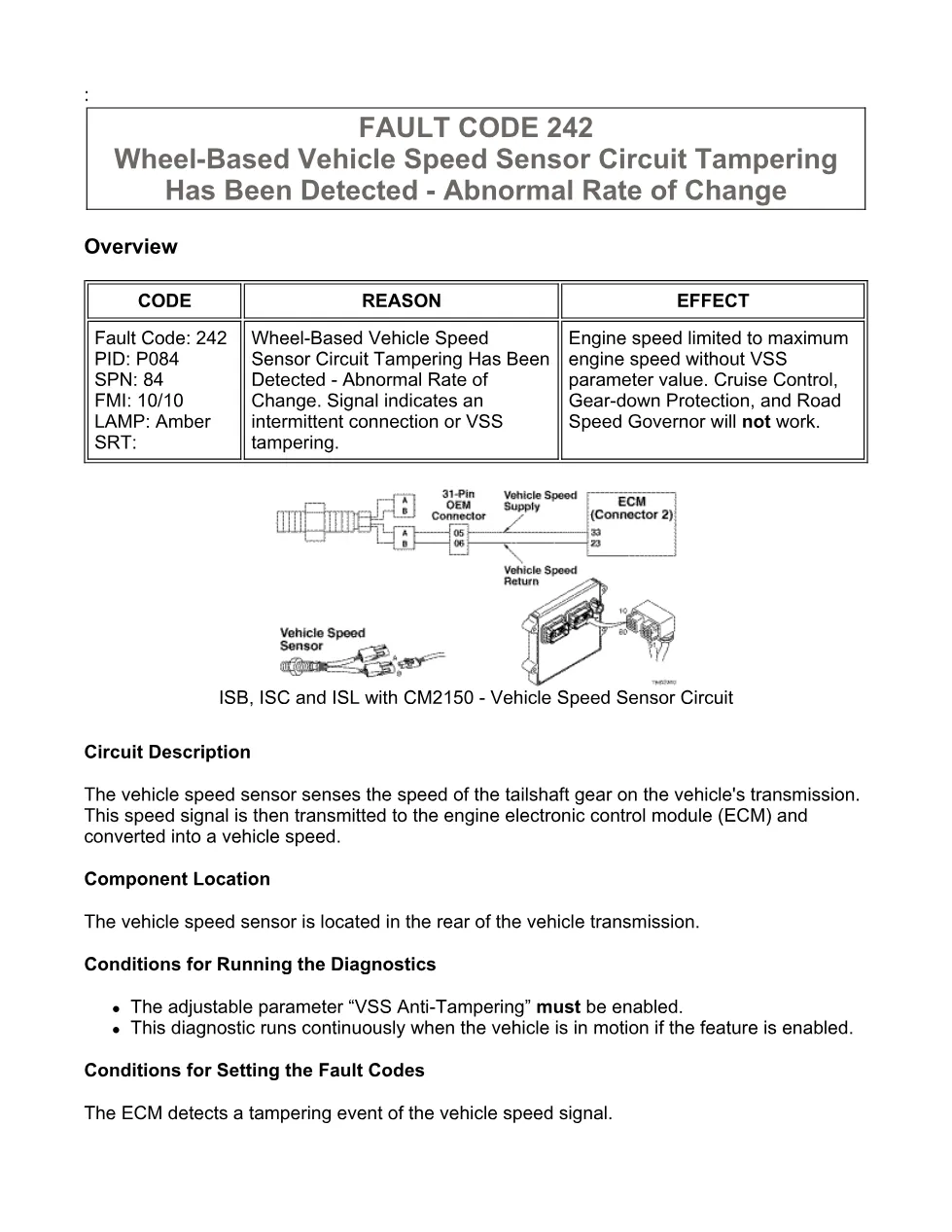
- Circuit Description
- Component Location
- Conditions for Running the Diagnostics
- Conditions for Setting the Fault Codes
- Action Taken When the Fault Code is Active
- Conditions for Clearing the Fault Code
- Shop Talk
- Associated Procedures
- Troubleshooting Steps
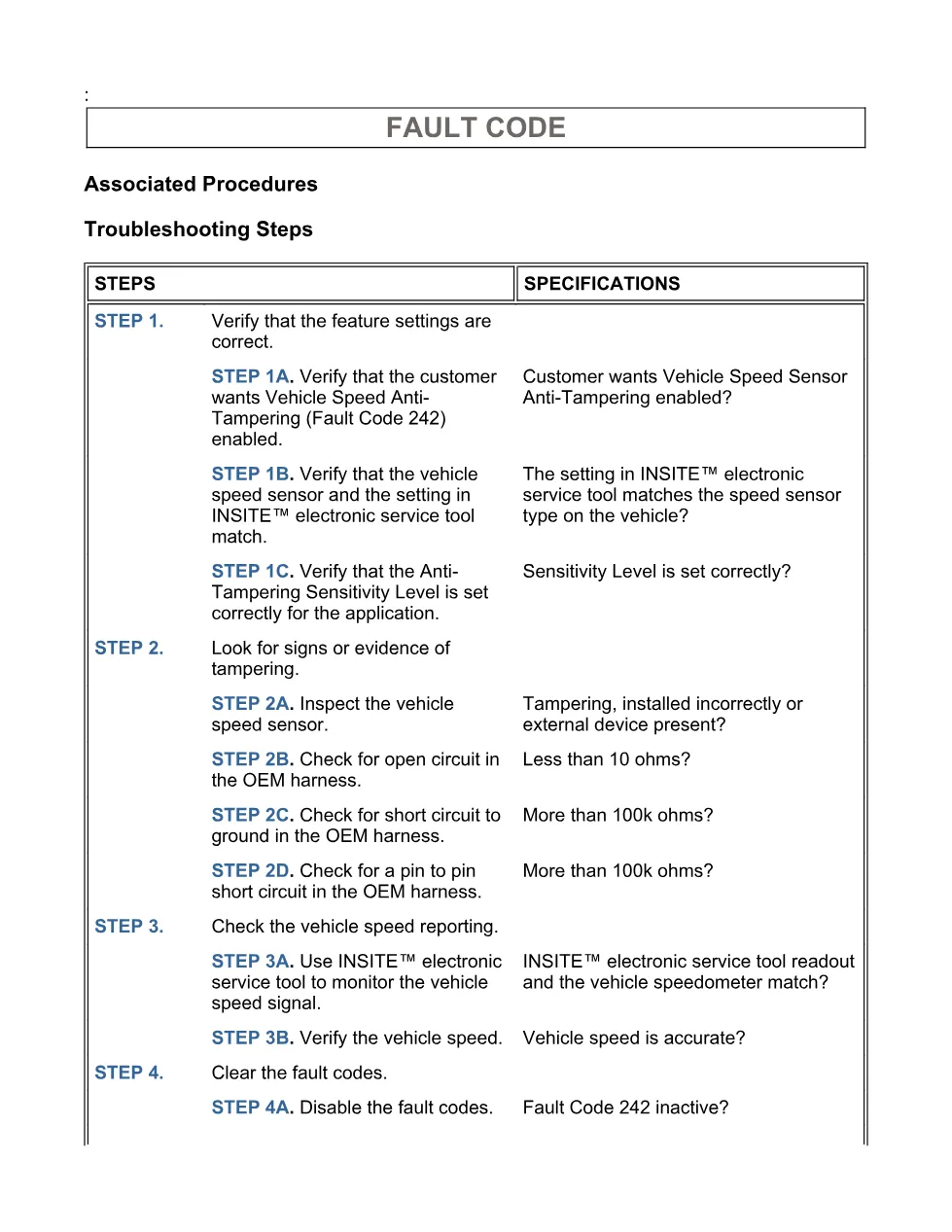
- Guided Step 1 – Verify that the feature settings are correct.
- Guided Step 2 – Look for signs or evidence of tampering.
- Guided Step 3 – Check the vehicle speed reporting.
- Guided Step 4 – Clear the fault codes.
Applicable truck models
This file applies to Cummins ISB, ISC and ISL engines with CM2150 electronic control modules, with the document library grouping identifying ISB6.7 CM2150 (2007-09). The diagnostic concerns the vehicle speed sensor at the rear of the vehicle transmission, the ECM vehicle speed calculation, and VSS Anti-Tampering settings controlled through INSITE™ electronic service tool. See the manufacturer at Cummins official website.
Who needs this code 242 DTCs manual
Workshop technicians need this code 242 DTCs manual when an amber CHECK ENGINE lamp is linked to abnormal vehicle speed signal rate of change, intermittent VSS connection, or possible VSS tampering. Fleet repair shops can use it to confirm feature settings, sensor type, sensitivity level, tire size, rear axle ratio, tailshaft gear teeth, and OEM harness condition before replacing parts.
The procedure directs mechanics to verify whether Vehicle Speed Sensor Anti-Tampering should be enabled, confirm that the INSITE™ vehicle speed sensor type matches the physical sensor, and set the Vehicle Speed Signal Tampering Sensitivity Level for the application. It also lists inspections for improper sensor mounting, poor harness connection, external devices installed in place of the sensor, and other evidence of tampering.
Electrical checks in the PDF include open-circuit resistance checks in the OEM harness, short-to-ground checks for magnetic vehicle speed sensor SIGNAL (+) and SIGNAL (-) circuits, and pin-to-pin short checks at the OEM harness ECM connector. The stated pass points shown in the extract include less than 10 ohms for open-circuit checks and more than 100k ohms for short-circuit checks.
The final steps use INSITE™ electronic service tool to compare vehicle speed reporting with the dash speedometer, verify speed accuracy, disable the active fault condition with the keyswitch on and the vehicle stationary, and clear inactive fault codes after all components are connected. Full PDF available in the DiagTechPro manuals library, free account required to download.
Related manuals library
Sản phẩm liên quan cho hãng này
Cùng brand theo taxonomy hiện có trong catalog WooCommerce.

Cummins Calterm Version 5.16 – Advanced ECM Control and Precision Tuning for Cummins Engines

Cummins INSITE 9.3 – The Essential Diagnostic Tool for Cummins Engines

Cummins InCal CE – The Calibration and Configuration Tool for Cummins Engines


