
This Cummins J1939 fault code document covers Fault Code 286 for J1939 datalink multiplexing on Cummins ISB CM550 applications. It explains why the ECM logs the code when configured multiplexed switches do not match information transmitted by the vehicle electronic control unit. The procedure focuses on VECU configuration, ECM feature settings, diagnostic tool checks, and final fault-code clearing.
Official Cummins J1939 fault code document details
| Brand | Cummins |
|---|---|
| Model coverage | ISB CM550 (1990-94) |
| System/Group | DTCs; J1939 Datalink Multiplexing Circuit |
| Year/Revision | Unknown |
| Pages | 2 |
| File size | 0.2 MB |
| Format | |
| Language | English |
Document table of contents
- CUMMINS
- FAULT CODE: 286
- PID: S231
- SPN: 639
- FMI: 13
- J1939 DATALINK MULTIPLEXING
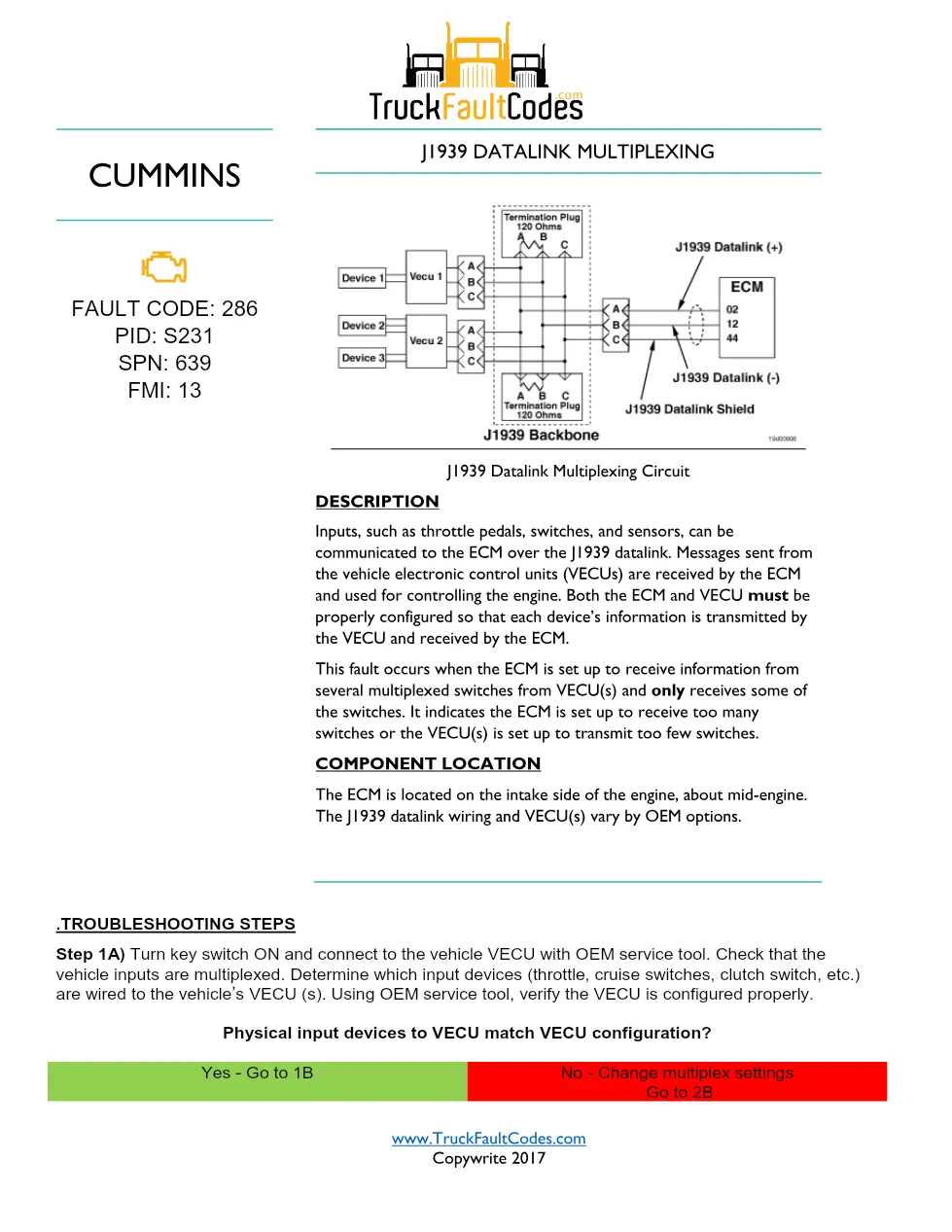
- J1939 Datalink Multiplexing Circuit
- DESCRIPTION
- COMPONENT LOCATION
- TROUBLESHOOTING STEPS
- Step 1A) Turn key switch ON and connect to the vehicle VECU with OEM service tool
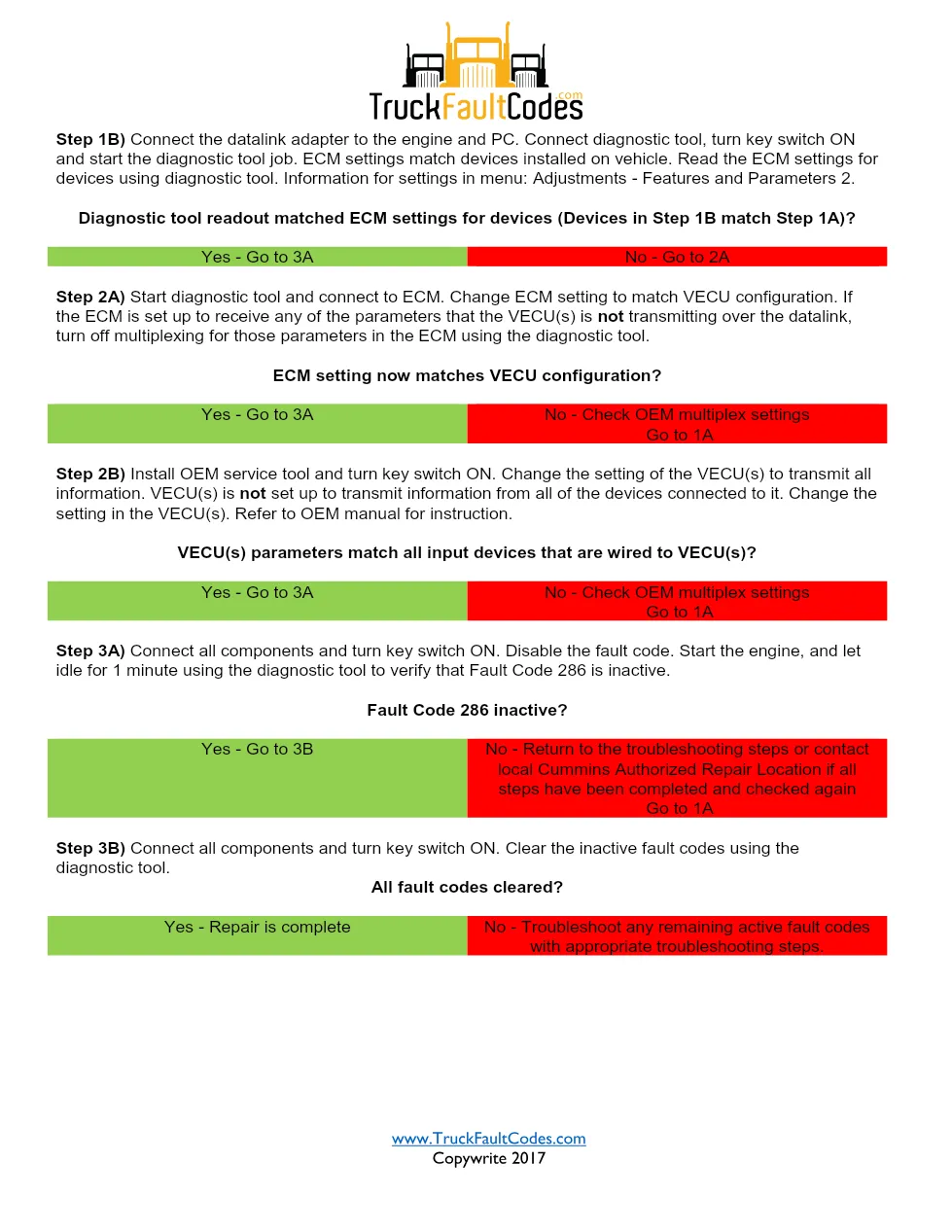
- Step 1B) Connect the datalink adapter to the engine and PC
- Step 2A) Start diagnostic tool and connect to ECM
- Step 2B) Install OEM service tool and turn key switch ON
- Step 3A) Connect all components and turn key switch ON
- Step 3B) Connect all components and turn key switch ON
Applicable truck models
This file applies to Cummins ISB CM550 engines in the 1990-94 coverage group where vehicle inputs such as throttle pedals, cruise switches, clutch switch, and other switches or sensors are communicated to the ECM over the J1939 datalink. The document notes that the ECM is located on the intake side of the engine, about mid-engine, while the J1939 datalink wiring and VECU locations vary by OEM options. For manufacturer information, visit the Cummins official website.
Who needs this Cummins J1939 fault code manual
Workshop technicians, fleet mechanics, and diagnostic tool users need this Cummins J1939 fault code manual when Fault Code 286, PID S231, SPN 639, FMI 13 is active or stored. It is most useful when checking whether physical input devices wired to the VECU match VECU configuration and whether ECM settings match the devices installed on the vehicle.
The troubleshooting flow directs the mechanic to verify vehicle inputs with an OEM service tool, read ECM settings through Adjustments – Features and Parameters 2, and change ECM or VECU settings when the two sides do not match. It also covers turning off multiplexing for ECM parameters that the VECU is not transmitting, confirming that VECU parameters match all input devices, disabling the fault code, idling the engine for 1 minute, and clearing inactive fault codes after repair verification.
The full PDF is available in the DiagTechPro manuals library, free account required to download.
Related manuals library
Sản phẩm liên quan cho hãng này
Cùng brand theo taxonomy hiện có trong catalog WooCommerce.

Cummins Calterm Version 5.16 – Advanced ECM Control and Precision Tuning for Cummins Engines

Cummins INSITE 9.3 – The Essential Diagnostic Tool for Cummins Engines

Cummins InCal CE – The Calibration and Configuration Tool for Cummins Engines


