
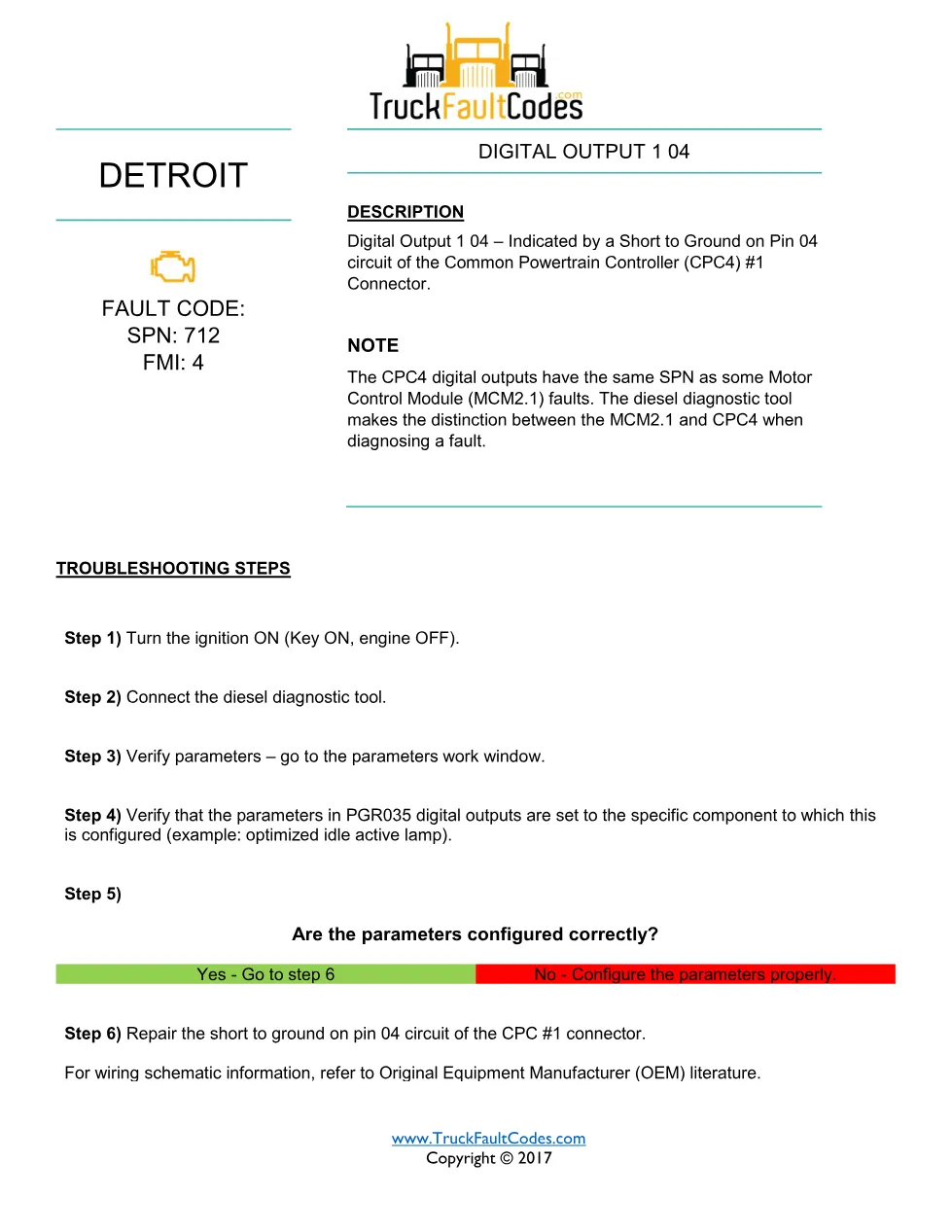
The Detroit SPN 712 FMI 4 fault sheet is a single-page DTC reference that identifies a digital output 1 04 condition on the DD Series (EPA 2007-Current) powertrain. It describes the short to ground on pin 04 of the CPC4 #1 connector, names the controller connector involved, and explains how the diesel diagnostic tool tells powertrain-controller outputs apart from engine-controller faults that carry the same code.
Official document details
| Brand | Detroit |
|---|---|
| Model coverage | DD Series (EPA 2007-Current) — GHG14 emissions platform |
| System / Group | DD Series (EPA 2007-Current) / DTCs — Digital Output 1 04 circuit |
| Fault code | SPN 712 / FMI 4 |
| Source | TruckFaultCodes.com fault-code reference (© 2017) |
| Year / Revision | Copyright 2017 |
| Pages | 1 |
| File size | 0.2 MB |
| Format | |
| Language | English |
Document table of contents
- Fault code identification for SPN 712 under failure mode 4
- Digital Output 1 04 description
- Affected circuit, pin and CPC4 #1 connector
- CPC4 versus MCM2.1 shared-SPN distinction note
- Step-by-step troubleshooting procedure
Applicable truck models and engines
This reference applies to Detroit DD Series (EPA 2007-Current) engine platforms fitted with the Common Powertrain Controller, and the code is catalogued for both current DD Series and Series 60 (DDEC VI, EPA 2007) installations. Because harness routing varies by chassis, always confirm pin assignments against the Original Equipment Manufacturer (OEM) schematic before testing. For engine and emissions-system references, see Detroit’s official powertrain resources.
Who needs this SPN 712 FMI 4 manual
This sheet is written for heavy-duty truck technicians and independent workshop owners who pull the code on a Detroit-powered unit and want a fast, accurate description of the failing circuit before they open the wiring harness or condemn a part.
Troubleshooting the SPN 712 FMI 4 fault
The document notes that CPC4 digital outputs share the same SPN as some MCM2.1 faults, so use the diesel diagnostic tool to confirm the code originates in the powertrain controller before following these steps:
- Turn the ignition ON (key on, engine off).
- Connect the diesel diagnostic tool and open the parameters work window.
- Verify that the PGR035 digital output parameters are set to the component this output is configured for (for example, the optimized idle active lamp).
- If the parameters are not configured correctly, correct them; then repair the short to ground on pin 04 of the CPC #1 connector using the OEM wiring schematic.
The full 1-page PDF, with its wiring notes and repair guidance, is available in the DiagTechPro manuals library; a free account is required to download.
Related manuals library
Sản phẩm liên quan cho hãng này
Cùng brand theo taxonomy hiện có trong catalog WooCommerce.
Detroit Diesel Reports 6.3
Detroit Reprogramming Station (DDRS) 7.11

DDDL Backdoor Password: A Comprehensive Guide